Kingfisher Watch: Command for the Cellular Layer
Kingfisher units find the activity. Kingfisher Watch is where your team sees it and acts on it.
Kingfisher Watch is the command platform on your own systems. It provides live maps, heatmaps, a SOC dashboard, dispatch and multiple display options.
Request an EvaluationRequest a Demonstration
One Live View of the Cellular Environment
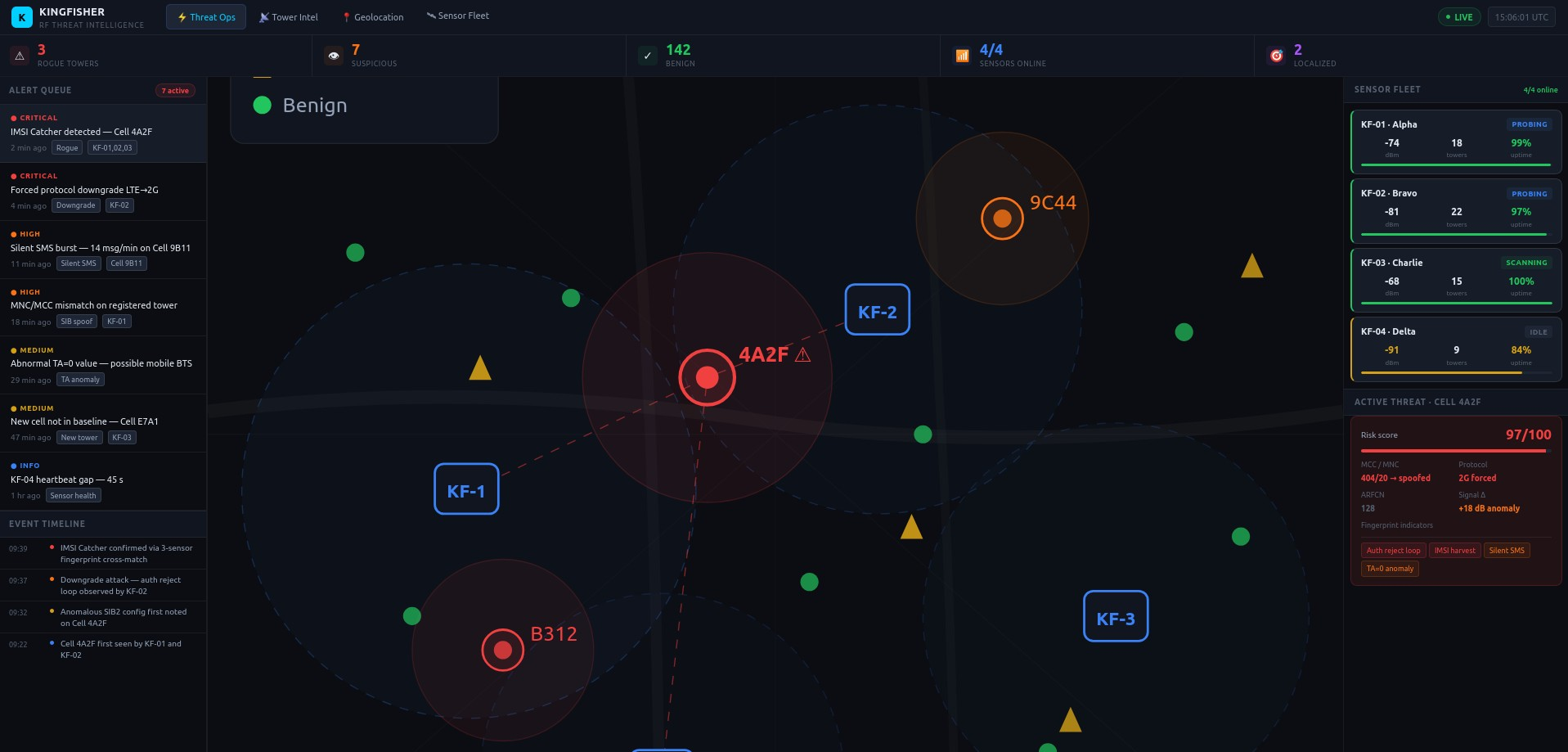
Every deployed Kingfisher unit sends its findings to Kingfisher Watch. Kingfisher Watch takes the findings from every unit and turns them into a live view your operators can work from.
It shows your team the protected area as it is right now: what is on the air, where activity is occurring and which events need attention.
Kingfisher detects. Kingfisher Watch shows.
Live Maps
The live map shows where activity is occurring across the protected area, together with the Kingfisher units watching it.
Your team works from a map of the ground they are responsible for.
Heatmaps
Heatmaps help reveal patterns.
A single event can be easy to miss. A heatmap helps your team see where attention is needed across the protected area.
SOC Dashboard
The SOC dashboard keeps each event organized for your security team.
Because Kingfisher profiles cellular towers and their configurations, each event arrives with the technical detail needed to judge it. The dashboard puts that detail in front of your operators so they can decide what it means.
Filters
Filters let operators narrow the view to what matters for the task in front of them.
A busy cellular environment holds a lot of legitimate activity. Filters help keep the event that needs attention from getting buried.
Dispatch
Dispatch is part of Kingfisher Watch.
The same platform that shows your team the threat also supports the response.
Multiple Display Options
Kingfisher Watch provides multiple display options, so you can set up the view to suit your operators and the room they work in.
On Your Own Systems
Kingfisher Watch and all collected data are on your own systems, and you own and control them. Kingfisher units are remote sensors and do not store data.
Open APIs feed your SOC.
Kingfisher monitors cellular infrastructure, not individual phones.
For organizations protecting sensitive operations, customer control is built in from the start.
Frequently Asked Questions
Kingfisher Watch is the command platform on your own systems. It provides live maps, heatmaps, a SOC dashboard, dispatch and multiple display options. It receives findings from Kingfisher units and turns them into a live view your operators can understand and use.
No. Kingfisher detects. Kingfisher Watch shows. Kingfisher units in the field do the detecting and send their findings to Kingfisher Watch, which displays them for your team.
A live map of where activity is occurring, heatmaps that help reveal patterns and a SOC dashboard that keeps each event organized for your security team.
Yes. Open APIs feed your SOC.
Yes. Dispatch is a Kingfisher Watch capability.
Yes. Filters let operators narrow the view to what matters for the task in front of them.
Kingfisher Watch provides multiple display options. A demonstration shows how they would fit your team.
See Kingfisher Watch With Your Team at the Screen
Bring your operators. We'll show them the live view, from the first detection to the response. To follow a detection step by step, see How It Works.