
How Kingfisher Works: From the Field to Your Screen
Finding radio signals is easy. The spectrum is full of them.
The hard part is knowing which cellular infrastructure belongs, which doesn't, where the suspicious activity is and how to show it to the people who have to act.
Kingfisher handles the field detection, while Kingfisher Watch turns those findings into something your team can use.
Three Steps, Two Systems
Kingfisher detects. Kingfisher Watch shows.
1. Kingfisher Detects
Kingfisher units in the field watch the cellular environment around them. Each unit profiles cellular towers and their configurations across 2G–5G in under two minutes and flags infrastructure and behavior that don't fit. See Profiling and Validation.
2. Findings Go to Kingfisher Watch
Each unit shares what it sees with neighboring Kingfisher units and sends its findings to Kingfisher Watch on your own systems. The units themselves store no data. See Kingfisher Network.
3. Kingfisher Watch Shows the Threat
Kingfisher Watch shows your team the protected area as it is right now. The live map shows where activity is occurring, heatmaps help reveal patterns, and the SOC dashboard keeps each event organized for your security team. Dispatch is part of the same platform.
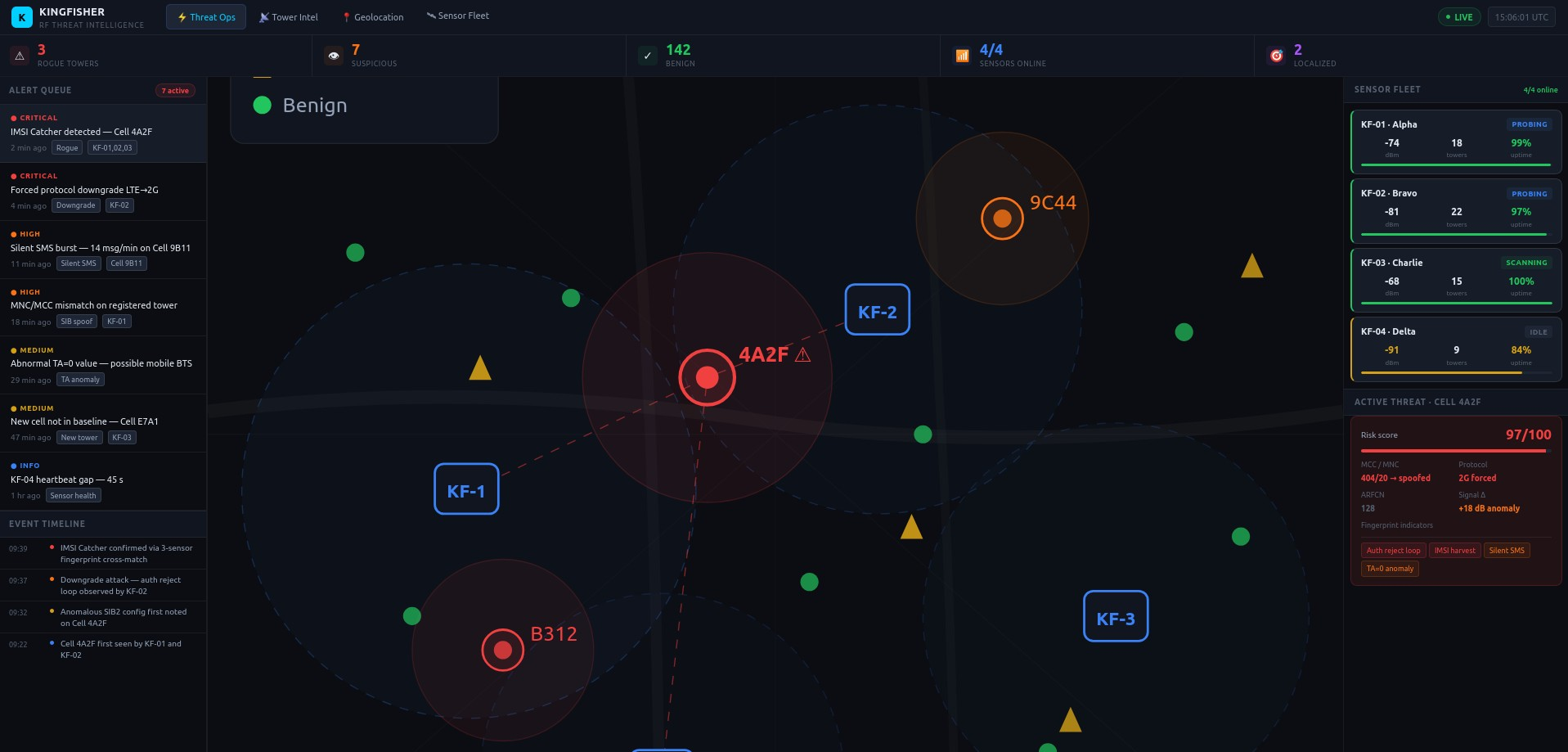
Detect → Profile → See → Decide → Respond
Kingfisher does the field work. Kingfisher Watch does the command work. Your team makes the call.
Control Stays on Your Own Systems
Kingfisher Watch and all collected data are on your own systems, and you own and control them. Kingfisher units are remote sensors and do not store data.
Open APIs feed your SOC.
Kingfisher monitors cellular infrastructure, not individual phones. Kingfisher stores no bystander phone data, and the work of identifying suspicious cellular infrastructure is done by Kingfisher's own code.
Frequently Asked Questions
Kingfisher units in the field detect and profile cellular infrastructure and send their findings to Kingfisher Watch. Kingfisher Watch shows your team the threat on live maps, heatmaps and a SOC dashboard, on your own systems. Kingfisher detects. Kingfisher Watch shows.
The finding goes to Kingfisher Watch. Your team sees it on the live map and SOC dashboard, decides what it means and, if it needs a response, dispatch is part of the same platform.
Kingfisher Watch and all collected data are on your own systems, and you own and control them. Kingfisher units are remote sensors and do not store data.
Start with the environment you need to protect. A demonstration walks through the whole workflow, from detection in the field to the live view in Kingfisher Watch. You can request an evaluation or request a demonstration on our Contact page.
Put the Technology to Work Where You Operate
Test Kingfisher against your real environment, with your team at the screen.